One ticket, five systems: How a support agent works
A fictional support case shows how an agent connects information from five systems, prepares a change and hands over with context when exceptions arise.
By Christian Fehrlin

“The replacement part is being delivered to the wrong address. Can you still change it?” The message is short. A reliable answer needs more than the ticket: who is asking, which order do they mean, has the warehouse already packed it, what change is still permitted, and who confirms it? A support agent can bring this work together when it can query the systems selectively and act within defined limits.
The following explicitly fictional case moves through five classes of system. It is a design for a pilot, not a description of an installed customer solution. A customer has used an authenticated service portal to request an address correction for an ordered spare part. The agent may read information, request missing details and execute a change only when the business conditions are met.
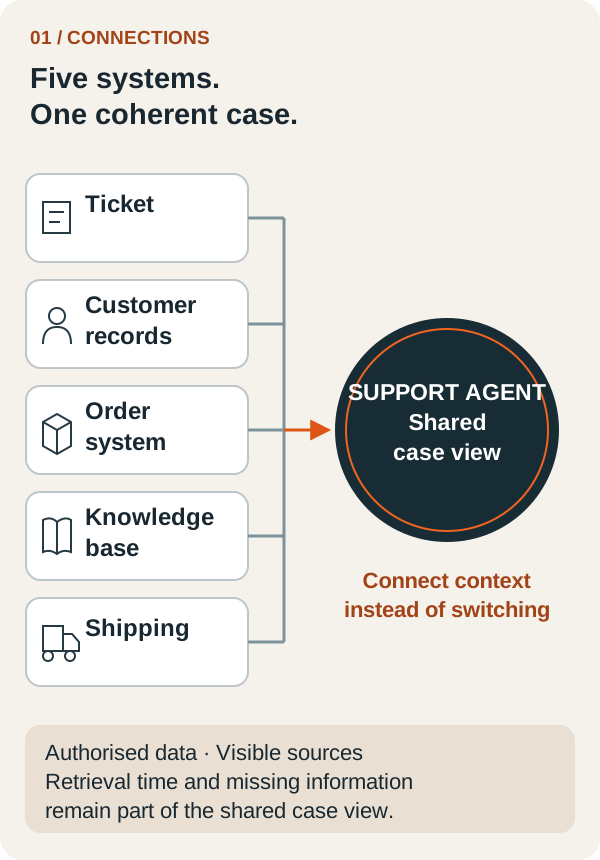
Five systems, one shared view of the case
The ticketing system provides the request and previous conversation. Customer management supplies the associated organisation and the requester's role. The ERP contains the order and delivery address. The knowledge base describes the current change policy. The dispatch system shows whether the consignment has already been handed to the carrier. None of these sources answers the whole request alone.
The agent needs a bounded case view. It contains relevant details with their source and retrieval time, plus explicitly marked gaps. A missing dispatch status must not be treated as “not yet dispatched”. Nor does a successful customer lookup establish authority to change any order.
| Source in the example | Information needed | Access boundary |
|---|---|---|
| Ticketing system | Request, history, open steps | Assigned case only |
| Customer management | Organisation and verified role | Authorised customer account only |
| ERP | Order number, current delivery address | Affected order only |
| Knowledge base | Current policy for address changes | Approved, applicable version |
| Dispatch system | Handover and change status | Relevant consignment only |
This design fits Deep Impact's published approach to AI agents with defined tools and approvals. The specific connections and permissions must be assessed for each business.
Identify the transaction unambiguously first
The agent associates the ticket with the authenticated customer account. If the message contains two possible order numbers, it asks which one is intended before preparing a change. It requests only the missing detail. Confidential order data from another account must remain inaccessible even if a company with a similar name is found.
In the example, the check identifies one order. The person is authorised to request an address correction for it. The agent now reads the dispatch status and current policy. In this pilot scenario, a correction is permitted only before handover to the carrier. That boundary is an assumption of the example, not a universal shipping rule.
The interface should return understandable results: “change still permitted”, “already handed over” or “status currently unknown”. This reduces avoidable interpretation. Anthropic recommends a small set of purpose-built tools with clear responsibilities and meaningful responses. Designing tools for agents
A follow-up question should save work
The message contains the new address, but the building number is missing. The agent asks for that specific detail and identifies the affected order within the authorised customer account. It does not make the customer tell the story again. After her response, it presents the complete new address for confirmation and explains that eligibility will be checked again immediately before execution.
That follow-up is part of the workflow. It does not replace internal approval if the business requires it for address changes. Customer confirmation, internal authorisation and current system state are separate prerequisites. All three must be visible in the pilot. The interface should also make the AI assistant's involvement clear and provide a direct route to the support team.
Execute a change and read the result
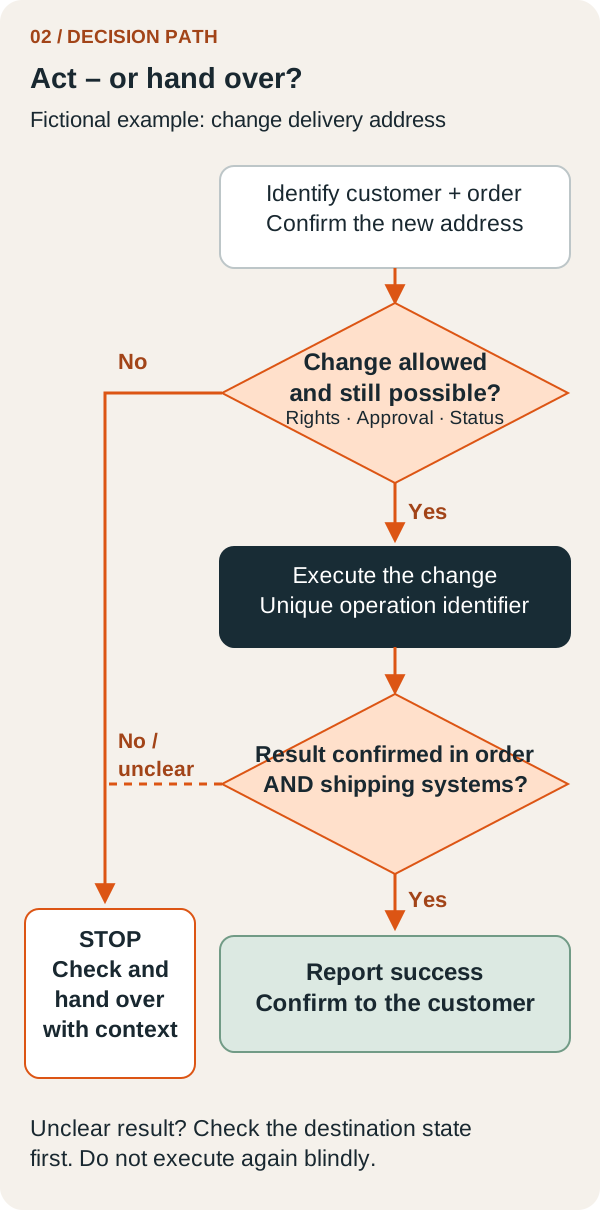
After the required confirmation, the executing service checks permissions and dispatch status again. The check and change must be technically protected so that a handover that has since occurred prevents the correction. An agent that read “still open” minutes earlier must not treat that old state as ongoing permission.
The action receives a unique operation identifier. If no response arrives after the write, the system first looks for the result of that operation. It does not blindly submit the same change again. Only a confirmed record with the right address permits a message saying that the correction has been applied. If dispatch cannot yet confirm the new address, that step remains open and is communicated as such.
A business definition of success helps here: “New address saved on the authoritative order and confirmed by dispatch for this consignment.” The test must check that state. Anthropic likewise distinguishes the execution transcript from the outcome actually achieved when evaluating agents. Evaluating agents systematically
Preserve context when handing over
If the parcel is already in transit, a person takes over. The handover contains the customer's request, verified identity, relevant order and dispatch details, questions already answered and the specific reason for stopping. It also includes the next possible step, such as a review by the dispatch team. A new delivery commitment remains open until the responsible team confirms it.
The customer learns who is taking ownership and what response to expect next. Closing the ticket would be premature. For the support team, what matters is being able to continue immediately. The agent has done useful preparation even when it could not resolve the case itself. Our article on agentic infrastructure explains how such boundaries fit into the technical operating model.
Test the pilot at its difficult points
Before going live, the team should run the workflow with test data: a wrong customer association, a missing building number, an outdated policy, a carrier handover during the follow-up conversation, and a timeout after a successful change. For each case, record the expected state, permitted communication and responsible person. Instructions embedded in attached documents must not create additional permissions either.
Then measure how much human investigation and repeated questioning remains. As a purely illustrative calculation, reducing the effort to assemble one case from six to two minutes across 80 cases per week releases 320 minutes, or five hours and 20 minutes. Deduct additional checking and maintenance time. The example is not a measured savings promise.
The next concrete step is small: choose one type of request and map its path through the necessary systems. Mark every missing piece of information and every binding action. This gives a support agent a task that can be tested. Walk through a support workflow with Deep Impact.